반응형
본 내용은 인프런의 이도원 님의 강의 "Spring Cloud로 개발하는 마이크로서비스 애플리케이션(MSA)" 내용을 바탕으로 정리한 내용입니다.
게이트웨이 서버로 사용자 서버 호출
UserController 수정
package com.example.UserService.controller;

import com.example.UserService.service.UserService;
import com.example.UserService.vo.Greeting;
import org.springframework.beans.factory.annotation.Autowired;
import org.springframework.core.env.Environment;
import org.springframework.web.bind.annotation.*;

@RestController
public class UserController {
    private UserService userService;
    private Environment env;
    @Autowired
    private Greeting greeting;

    @Autowired
    public UserController(UserService userService, Environment env){
        this.userService = userService;
        this.env = env;
    }

    @GetMapping("/userService/health_check")
    public String status(){
        // 랜덤으로 설정된 서버 포트를 알려준다.
        return String.format("It's Working in User Service on PORT %s",
                env.getProperty("local.server.port"));
    }

    /**
     * http://localhost:랜덤포트/welcome 호출시 프로퍼티 greeting.message 값이 출력된다.
     * @return
     */
    @GetMapping("/welcome")
    public String welcome(){
        return greeting.getMessage();
    }
}- 게이트웨이 서버를 통해 사용자 서버의 상태와 환영 메시지를 호출할 수 있도록 메서드를 추가한다.
- status(): 사용자 서버 상태를 확인한다.
- 경로:
http://localhost:8080/userService/health_check - 결과: 사용자 서버가 작동 중인 포트를 반환한다.
- 경로:
- welcome(): 설정된 환영 메시지를 반환한다.
- 경로:
http://localhost:8080/welcome - 결과:
greeting.message프로퍼티 값이 출력된다.
- 경로:
사용자 정보 조회
ResponseOrder 생성
package com.example.UserService.vo;

import lombok.Data;

import java.util.Date;

@Data
public class ResponseOrder {
    private String productId;
    private Integer aty;
    private Integer unitPrice;
    private Integer totalPrice;
    private Date createdAt;

    private String orderId;
}- 주문 정보를 담는 VO 클래스.
- 각 주문의 ID, 수량, 단가, 총 금액, 생성 날짜를 포함한다.
ResponseUser 수정
package com.example.UserService.vo;

import com.fasterxml.jackson.annotation.JsonInclude;
import lombok.Data;

import java.util.List;

/**
 * 반환시 사용할 vo
 */@Data
@JsonInclude(JsonInclude.Include.NON_NULL)
public class ResponseUser {
    private String email;
    private String name;
    private String userId;

    private List<ResponseOrder> orders;
}- @JsonInclude(JsonInclude.Include.NON_NULL) : json 값 중 NULL이 아닌 데이터만 받는다.
- 사용자 정보를 반환할 때 사용할 VO 클래스.
- 사용자 정보와 함께 주문 목록을 포함한다.
UserDto 수정
package com.example.UserService.dto;

import com.example.UserService.vo.ResponseOrder;
import lombok.Data;

import java.util.Date;
import java.util.List;

/**
 * 데이터 이동시 사용
 */
@Data
public class UserDto {
    private String email;
    private String pwd;
    private String name;
    private String userId;
    private Date createAt;
    // 암호화된 패스워드
    private String encryptedPwd;
    private List<ResponseOrder> orders;
}- 데이터 이동 객체(DTO)로, 사용자 정보를 포함하며 주문 목록도 추가된다.
UserRepository 메서드 추가
UserEntity findByUserId(String userId);- 사용자 ID로 사용자 정보를 조회하는 메서드를 추가한다.
UserService 메서드 추가
UserDto getUserByUserId(String userId);
Iterable<UserEntity> getUserByAll();
UserServiceImpl 메서드 추가
/**
 * 사용자 ID로 사용자 정보 조회
 * @param userId
 * @return
 */
@Override
public UserDto getUserByUserId(String userId) {
    UserEntity userEntity = userRepository.findByUserId(userId);
    if(userEntity == null) {
        throw new UsernameNotFoundException("User not found");
    }
    UserDto userDto = new ModelMapper().map(userEntity, UserDto.class);

    List<ResponseOrder> orderList = new ArrayList<>();
    userDto.setOrders(orderList);

    return userDto;
}

/**
 * 전체 사용자 조회
 * @return
 */
@Override
public Iterable<UserEntity> getUserByAll() {
    return userRepository.findAll();
}- getUserByUserId(String userId)
- 사용자 ID로 사용자 정보를 조회한다.
- 주문 정보는 현재 비어 있는 리스트로 반환된다.
- getUserByAll()
- 전체 사용자 정보를 조회한다.
UserController 메서드 추가
/**
 * 사용자 정보 전체 조회
 * @return
 */
@GetMapping("/users")
public ResponseEntity<List<ResponseUser>> getUsers(){
   Iterable<UserEntity> userList = userService.getUserByAll();

   List<ResponseUser> result = new ArrayList<>();
   userList.forEach(v -> {
       result.add(new ModelMapper().map(v, ResponseUser.class));
   });

   return ResponseEntity.status(HttpStatus.OK).body(result);
}

/**
 * 사용자 정보 상세 조회
 * @return
 */
@GetMapping("/users/{userId}")
public ResponseEntity<ResponseUser> getUser(@PathVariable("userId") String userId){
    UserDto userDto = userService.getUserByUserId(userId);
    ResponseUser returnValue = new ModelMapper().map(userDto, ResponseUser.class);
    return ResponseEntity.status(HttpStatus.OK).body(returnValue);
}- 전체 사용자 조회와 특정 사용자 조회 기능을 추가한다.
- 전체 사용자 조회
- 경로: GET /users
- 결과: 모든 사용자 정보를 JSON 형식으로 반환한다.
- 특정 사용자 조회
- 경로: GET /users/{userId}
- 결과: 요청된 사용자 ID에 해당하는 정보를 JSON 형식으로 반환한다.
결과
사용자 등록
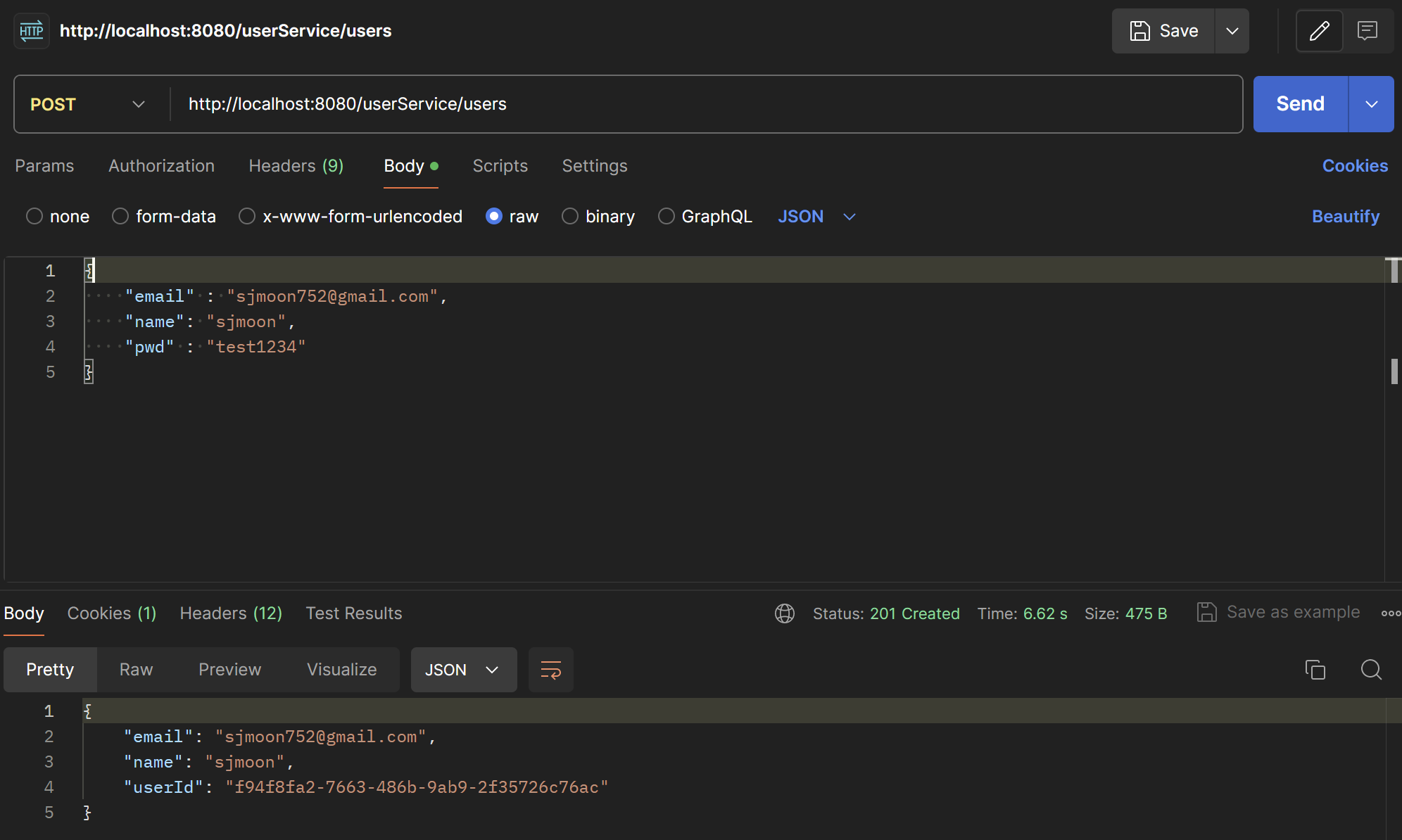
- 경로: POST http://localhost:8080/userService/users
- 입력 데이터: 사용자 이메일, 이름, 비밀번호
- 결과: 성공적으로 등록된 사용자 정보 반환.
전체 사용자 조회
[
    {
        "email":"sjmoon752@gmail.com",
        "name":"sjmoon",
        "userId":"저장된 userId"
    }
]- 경로: GET http://localhost:8080/userService/users
- 결과: 모든 사용자 정보를 JSON 리스트로 반환.특정 사용자 조회
[
    {
        "email":"sjmoon752@gmail.com",
        "name":"sjmoon",
        "userId":"저장된 userId",
        "orders":[]
    }
]- 경로: GET http://localhost:8080/userService/users/{userId}
- 결과: 요청된 사용자 ID에 맞는 사용자 정보를 JSON 형식으로 반환.
반응형
'Cloud > MSA' 카테고리의 다른 글
| [MSA] MicroService 구현(주문 서비스) (1) | 2024.11.27 |
|---|---|
| [MSA] MicroService 구현(상품 서비스) (0) | 2024.11.27 |
| [MSA] MicroService 구현(Spring Security) (0) | 2024.11.26 |
| [MSA] MicroService 구현(회원가입 구현) (0) | 2024.11.26 |
| [MSA] MicroService 구현(사용자 서비스) (0) | 2024.06.29 |